Prepare source data and configuration
Objective
This step prepares the sample document and verifies the configuration required for browser-to-S3 upload. Because the file is uploaded directly from the browser, the bucket configuration, CORS rules, and environment variables must align correctly.
Execution Steps
Before starting the direct browser-to-S3 upload flow, ensure the storage configurations are set correctly:
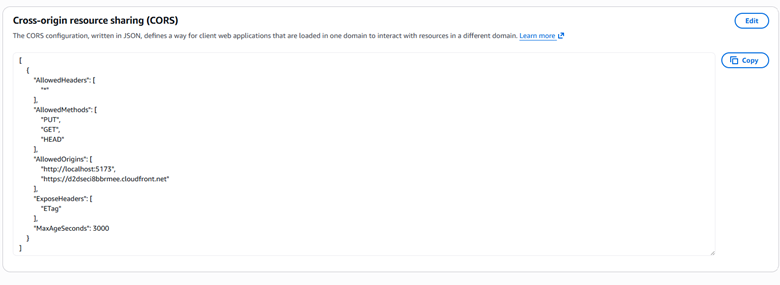
Step 1: Verify the CORS configuration on the upload S3 bucket to allow PUT or POST requests directly from the browser.
Step 2: Configure Public access for the frontend bucket, ensuring public access is not entirely blocked so static files can be served.

Step 3: Enable Static website hosting on the frontend bucket and point the index document to index.html.

Note: In addition to these S3 settings, prepare a sample document (like a PDF) and confirm that frontend and backend environment variables match.