Implement upload and storage flow
Objective
This section covers the most important implementation step in the workshop: moving a document from the web interface into CloudDoc by using a presigned upload flow and Amazon S3. It connects the user-facing upload experience with backend business logic and serves as the clearest proof that the project is implemented end-to-end rather than described only at a conceptual level.
Core components
- the upload form in the frontend,
- the API that creates presigned upload URLs,
- the S3 bucket that stores document objects,
- and the metadata persistence layer in the database.
Representative code
const upload = await presignUpload({
  fileName: file.name,
  fileType,
  contentType: file.type || "application/octet-stream",
  fileSizeBytes: file.size,
})

await uploadFileToS3(upload.uploadUrl, file)
documentsRouter.post("/presign-upload", async (req, res) => {
  const input = presignUploadSchema.parse(req.body)
  const key = createDocumentKey(input)
  const uploadUrl = await createPresignedUploadUrl({ key, contentType: input.contentType })
  res.status(201).json({ data: { key, uploadUrl, method: "PUT" } })
})
Upload execution steps
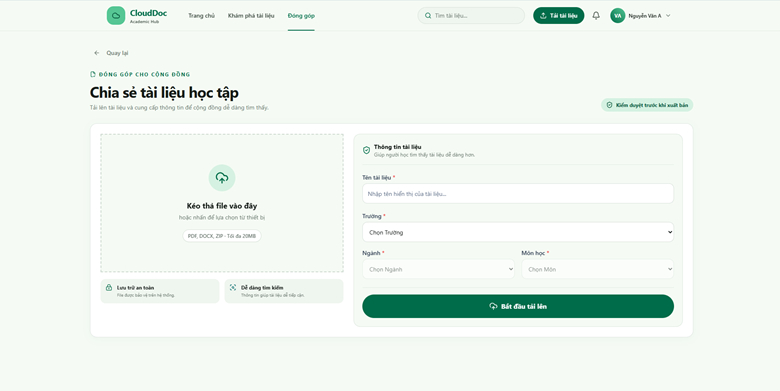
Step 1: The user fills in the form and selects a file to upload via the CloudDoc interface.
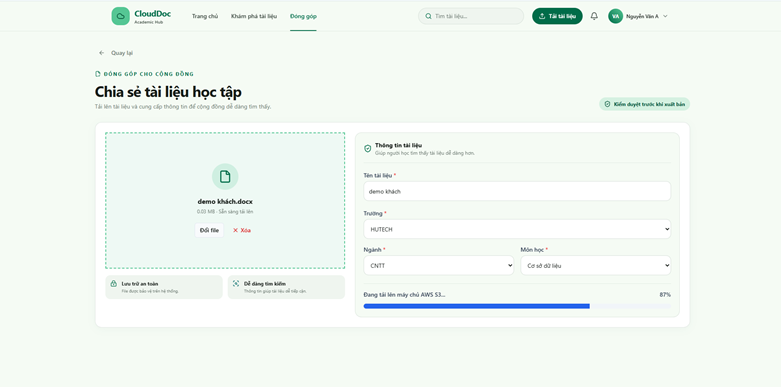
Step 2: The application retrieves a presigned URL and uploads the file directly from the browser to Amazon S3.
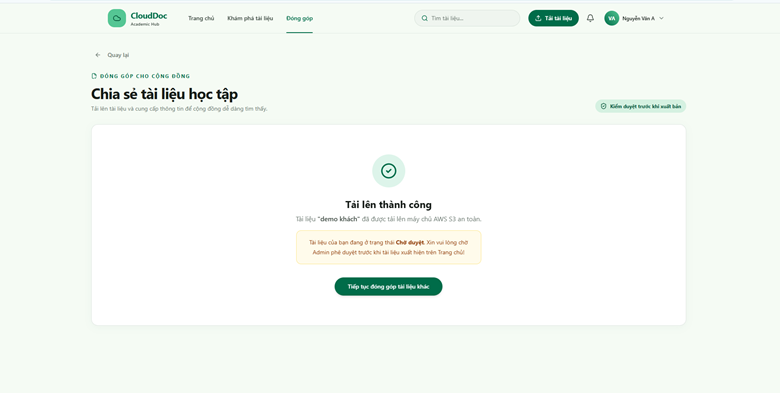
Step 3: A success notification is shown once the file upload to S3 and metadata save are completed.